The Hidden Fragility of Fixed-Height Card Layouts
Introduction: When Perfect Mockups Fail
It's a common scenario: a designer presents a mockup where every card in a grid aligns perfectly. Titles are concise, excerpts fit neatly, and the layout appears rock-solid. You implement the design exactly as specified, confident that you've delivered a polished component. But lurking beneath that tidy surface is a vulnerability that often goes unnoticed until real-world content enters the picture.
The Problem with Fixed Heights
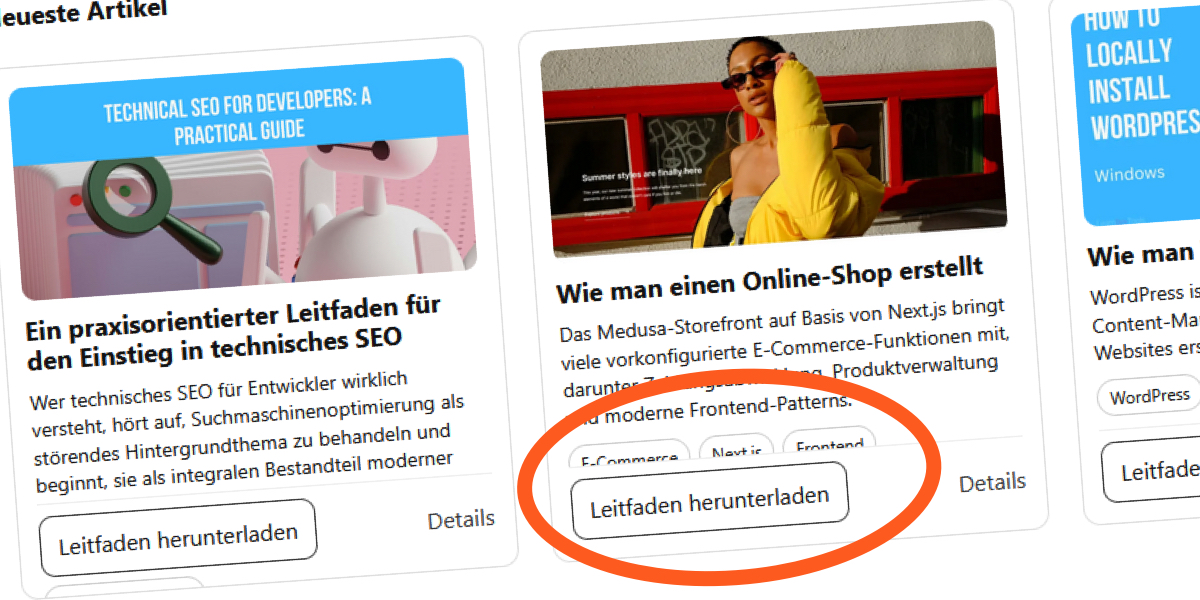
Fixed-height cards appear predictable, but they rely on an implicit assumption: that the content will always stay within a predetermined dimensional boundary. When that assumption breaks—due to editor updates, translated text, or user font size adjustments—the cards begin to show cracks. A recent experience building a "Recent Articles" section for a blog illustrated this perfectly.
What Happens When Content Changes?
The initial design assumed short English titles. Everything fit within a fixed box, and the grid remained uniform. However, once the actual content arrived, the layout shifted. English titles became longer, translations into French added extra words, and German text made matters even worse. Suddenly, text started overlapping, overflowing, or being clipped. The visual harmony crumbled.
A Live Demonstration
In a CodePen demo, the fragility becomes obvious. With the default browser settings, the cards look fine. But increase the base font size—as many users with low vision or digital eye strain do—and the pressure inside the cards builds. Text blocks grow, but the container remains the same height. Elements begin competing for space, and the browser resolves the conflict by either allowing overflow or clipping content entirely.
Why It Breaks: CSS Behavior Exposed
Normally, a block element expands to contain its content. But when you set a fixed height, you sever that natural relationship. The following CSS snippet shows a typical implementation:
.card__title {
  margin: 0 0 8px;
  font-size: 18px;
  line-height: 1.2;
  display: -webkit-box;
  -webkit-line-clamp: 2;
  -webkit-box-orient: vertical;
  overflow: hidden;
}

.card__excerpt {
  margin: 0 0 10px;
  font-size: 14px;
  line-height: 1.4;
  display: -webkit-box;
  -webkit-line-clamp: 3;
  -webkit-box-orient: vertical;
  overflow: hidden;
}
The overflow: hidden acts as a safety net, but it hides the problem rather than solving it. Remove that property, and the failure becomes visible: text spills out of the card, breaking the layout entirely.
Solutions: Building Resilient Card Components
Best Practices for Flexible Layouts
To avoid this fragility, consider these approaches:

- Use min-height instead of fixed height. This allows the card to grow if needed while maintaining a base size.
- Avoid pixel-perfect heights. Let the content determine the card's vertical size by using
height: autoormin-height. - Implement CSS Grid or Flexbox with align-items: stretch. This ensures cards in the same row have equal height without fixing a numeric value.
- Set a maximum height with overflow handling. If you must constrain height, use
max-heightcombined with a scroll or fade-out effect for long content. - Test with different languages and font sizes. Always include translations and zoom scenarios in your QA process.
Example of a Robust Implementation
Instead of fixed heights, use a flexible structure:
.card {
  display: flex;
  flex-direction: column;
  min-height: 200px;
  padding: 16px;
}

.card__title {
  margin: 0 0 8px;
  font-size: clamp(16px, 2vw, 20px);
  line-height: 1.3;
}

.card__excerpt {
  font-size: clamp(14px, 1.5vw, 16px);
  line-height: 1.5;
  flex-grow: 1;
}
This approach adapts to varying content lengths and user settings, maintaining readability and layout integrity.
Conclusion: Think Beyond the Mockup
Fixed-height cards may look clean in a design file, but they're more fragile than they appear. Real-world content—different languages, updated copy, accessibility needs—will put stress on those rigid dimensions. By embracing flexible, content-aware techniques, you can create components that remain resilient and user-friendly. Next time you see a perfectly aligned grid, question the assumptions behind it. Your future self (and your users) will thank you.
Related Articles
- Kubernetes v1.36: 6 Key Facts About In-Place Pod-Level Vertical Scaling (Now Beta)
- How to Dynamically Scale Pod-Level Resources in Kubernetes v1.36
- Kubernetes 1.36 Revolutionizes Resource Management: DRA Goes Mainstream with New Production-Grade Features
- Debian's New Stance: Making All Packages Reproducible
- How Standard Chartered Is Consolidating Digital Asset Custody: A Step-by-Step Guide to the Zodia Acquisition
- Windows 11 Gets Smarter, Faster, and Less Distracting: What You Need to Know
- The Dawn of the Agentic Cloud: A Recap of Cloudflare’s Agents Week 2026
- Discord Rolls Out End-to-End Encryption for All Voice and Video Calls, Blocking Even Its Own Access